Digital-Only Passport Photos: The May 2025/2026 Mandate for German Visa Applications
Since May 2025, Germany has required digital-only passport photos for residence permit applications, visa renewals, and official document submissions. The rule became mandatory from 31 July 2025 and remains in force in 2026. Paper photos are no longer accepted. The change affects everyone applying for or renewing a German residence permit, national visa, or similar document.
What this means for you
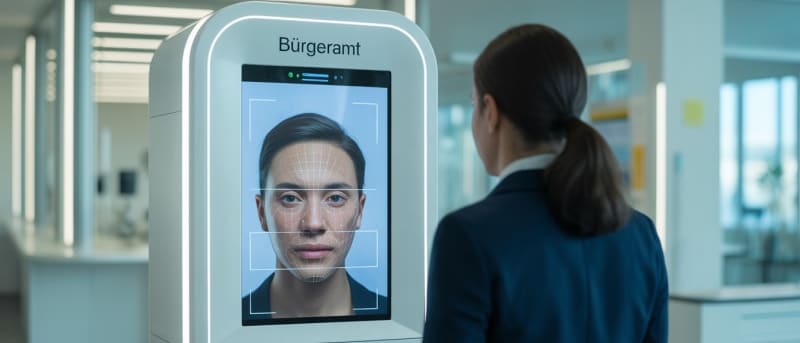
If you apply or renew in 2026, you must use a digital photo that meets German biometric standards. Get it from a registration office (Bürgeramt) kiosk if available, a certified studio with encrypted cloud/QR access, or—when applying from abroad—via the Consular Services Portal. Do not bring paper prints or selfies; they will be rejected. Check your local Bürgeramt’s website or call to see if they have on-site photo capture. If not, use a certified provider and keep the QR code or upload confirmation for your appointment.
What Changed: The May 2025/2026 Digital Photo Mandate
Before May 2025
Applicants could submit physical paper photos (35 mm × 45 mm), digital uploads via portals, or photos from booths and photographers. Many offices accepted a mix of paper and digital.
From May 2025 (Mandatory from 31 July 2025)
Germany now requires digital-only submissions: no paper photos after the cut-off. Photos must meet biometric standards (so-called biometric light images), and the system relies on certified digital upload stations with encrypted cloud access and QR codes. Many registration offices offer on-site photo capture; rollout is still ongoing, so not every office has it yet. Photos are stored in an encrypted cloud and linked to your application via QR code. Always confirm with your local office or mission whether they have a kiosk or expect you to bring a QR code from a certified provider.
The shift aims to improve security and biometric accuracy, cut manual scanning and errors, and align with broader digitalisation of identity and immigration in the EU.
Where to Get Digital Passport Photos in 2026
Option 1: Registration Office (Bürgeramt) On-Site Photo Capture
Best for: People already in Germany who can visit their local Bürgeramt.
Many registration offices are being equipped with on-site photo devices. You go in, use the device, and the photo is uploaded to the encrypted system; you receive a QR code. Cost is typically around €5–10. Not every office has a device yet—rollout continues into 2026. Always check your city’s or district’s website or call before visiting. If your office does not have a kiosk, use a certified studio (Option 2) and bring the QR code or upload details to your appointment.
Option 2: Certified Photo Studios with Encrypted Cloud Access
Best for: Anyone who needs a compliant photo before going to the office, or whose Bürgeramt does not yet offer on-site capture.
Certified studios (look for “Biometrisch zertifiziert” or similar) take your photo to German biometric standards and upload it to the secure system. You get a QR code to present at the registration office or to use in the Consular Services Portal. Cost is usually €8–15. Some chains (e.g. DM drogerie markt, post office services) offer compliant digital photos in this range; confirm they provide the encrypted cloud/QR option required for residence and visa procedures.
Option 3: Applying from Abroad (Consular Services Portal)
Best for: Applicants outside Germany applying for a national visa.
From 1 January 2025, many national visa applications are submitted via the Consular Services Portal (Auslandsportal). You upload your documents and photo there. The photo must still meet German biometric specifications even if taken in your home country. Use a local photographer who can produce ICAO-style biometric photos, or check whether your mission’s website lists recommended providers. Some consulates (e.g. in the US) note that compliant photos are not always easy to find nearby, so plan ahead.
In practice: If your local Bürgeramt does not have a kiosk yet, certified studios are the main alternative. In larger cities you will find several; in smaller towns you may need to travel or use an online-certified provider that gives you a digital file and/or QR code meeting the portal’s requirements.
Technical Specifications for Digital Photos (2026)
Photos must comply with ICAO-style biometric standards. Standard expectations include:
Format and resolution: 35 mm × 45 mm (digital equivalent), minimum 600 DPI, JPEG or PNG, max 5 MB, 24-bit colour. Background plain white or light grey (e.g. RGB 255,255,255 or 240,240,240).
Composition: Face centred and straight to camera. Face height about 70–80% of image height (roughly 32–36 mm from chin to top of head). Eyes open and visible, neutral expression, mouth closed. Religious head coverings are allowed if the face from chin to forehead and the eyes are fully visible; no shadows or distortion of facial features. Glasses are allowed only if they do not reflect light or hide the eyes. Hair must not cover the face or eyes.
Quality: Even lighting, no strong shadows, clear contrast between face and background, sharp and natural skin tones without filters. Official specifications are set by the federal government and published by the Bundesdruckerei and the Federal Ministry of the Interior (BMI); certified providers and many missions refer to these.
Step-by-Step: Getting and Submitting Your Digital Photo
1. Choose your method. Decide: Bürgeramt kiosk (if available), certified studio with cloud/QR, or Consular Portal upload (if abroad).
2. Prepare. Wear something that does not blend with a white/grey background. Remove non-religious headwear; ensure hair does not cover the face. If you wear glasses, avoid reflections—or remove them if the rules allow. Avoid heavy makeup that changes facial appearance.
3. Take or obtain the photo. At a kiosk, follow the on-screen instructions. At a studio, state that you need a German biometric passport photo for residence/visa. For the Consular Portal, get a digital file that meets the specs above.
4. Upload or hand over the reference. At a kiosk, upload is usually automatic and you get a QR code. At a certified provider, you receive a QR code or upload instructions for the portal. From abroad, upload the photo in the Consular Services Portal as part of your application.
5. Confirm acceptance. The portal or office system will validate the image. If it is rejected, you will typically see a reason (e.g. background, face size, quality). Fix the issue and resubmit; if in doubt, use a certified provider or a different kiosk.
Common Mistakes to Avoid
Using old paper photos or scans. Scanned or photographed paper prints rarely meet biometric standards and lack the required certification. Get a new digital photo from a certified source.
Selfies or phone photos. These usually fail on composition, resolution, and lighting. Use a kiosk or certified studio.
Wrong background. Only plain white or light grey is accepted. Coloured or patterned backgrounds lead to rejection.
Wrong face size or position. Face too small, too large, or off-centre often causes automatic rejection. Certified providers and kiosks are set up to meet the 70–80% face height rule.
Non-certified providers. If the provider is not certified for German biometric/cloud systems, the photo may not link to your application. Verify certification (e.g. “Biometrisch zertifiziert”) or use a kiosk or mission-recommended service.
Costs and Fees (2026)
Photo costs are separate from application fees. Expect roughly €5–10 at a registration office kiosk, €8–15 at certified studios, and similar ranges at DM or post office services that offer compliant digital photos. Residence permit applications are typically €75–110, visa applications €75, renewals around €50–80. These amounts can vary by federal state and document type.
When You Need Digital Photos
You need a compliant digital photo for first-time residence permits (including work, study, family reunification, Blue Card), for renewals and extensions, and when replacing a document with an outdated or invalid photo. If your appearance has changed significantly or your current photo is more than about six months old, get a new one. Some offices also request a new photo when you apply for a new document type.
Special Cases
Religious head coverings: Allowed if the face from chin to forehead and the eyes are fully visible, with no shadows or distortion.
Medical conditions: If your appearance is affected by a medical condition, contact the registration office or consulate in advance; they may allow adaptations or alternative documentation.
Children: The same digital and biometric rules apply. Parents can help with positioning; for very young children, missions sometimes allow a bit more flexibility on expression, but the technical standards still apply.
Verification and Troubleshooting
After uploading, check the Consular Services Portal or office confirmation. If you get an email confirmation, keep it. If your photo is rejected, the system usually gives a reason—adjust background, face size, resolution, or lighting and try again with a new file from a certified source. Common rejection reasons include non-compliant background, wrong face size or position, low resolution, wrong format or file size, and technical upload errors. If rejections persist, use a different certified provider or an in-office kiosk and, if needed, contact the mission or registration office.
Current Status and Outlook (2026–2027)
The digital-only mandate is in force across Germany. Rollout of kiosks and certified providers continues; more registration offices are expected to get on-site capture in 2026. Pilot projects for mobile or remote areas and improved automated validation are being developed. The system is also being aligned with EU digital identity and travel document standards.
Official Sources
Use these for current procedures and photo specifications:
Last checked: February 2026.
Next Steps
Confirm whether your local registration office has a photo kiosk; if not, book a slot at a certified studio and get your QR code or upload confirmation. If you apply from abroad, use the Consular Services Portal and ensure your photo meets German biometric requirements before you submit. For more on visa and residence rules, see our guides on B1 and permanent residency, Section 19c salary threshold, and biometric photo requirements.